
See how HVACR Studio turns field work into an engineering workflow.
Use the guided walkthroughs to understand Issue Finder, role-based Work Modes and connected professional records before entering the workspace. Authentic release-candidate captures sit alongside the guided visual walkthroughs so the page shows both the engineering sequence and the real product workspace.
No autoplay or marketing-only animation. Production video remains optional and user-controlled; the walkthroughs explain the real engineering sequence and link directly to the working product areas.
See how a field problem becomes a verified engineering trail.
Issue Finder & Fixer starts from the symptom, keeps checks and readings visible, and distinguishes corrective work from evidence-based verification.
Open Issue Finder & Fixer →
- 01OBSERVEStart from the symptomChoose the equipment and record what is actually happening before jumping to a cause.
- 02CHECKUse readings and guided checksFollow practical engineering checks and keep measured evidence close to the diagnosis.
- 03CORRECT + RETESTProve the interventionRecord the action, measure again and avoid treating completion as proof of success.
- 04VERIFY + CLOSEKeep the closure trailCompare the result with acceptance intent and preserve the evidence for future reference.
See how Work Modes simplify a mixed HVACR workforce.
Work Modes change the starting experience for technicians, engineers, consultants and facility teams without turning job roles into commercial packages.
Explore Work Modes →
- 01ROLEChoose today’s workStart as a site engineer, service technician, commissioning engineer, validator, facility team or reviewer.
- 02FOCUSSee relevant work firstBring the tools, checks and workflows for that responsibility forward without locking the user into one role.
- 03DEPTHStay simple until neededUse Free tools first; project history, evidence and reports add depth only when the work needs traceability.
- 04MOVEChange mode as the job changesWork Modes are experience filters, not subscription plans, so users can move across responsibilities.
See how commissioning, validation and O&M keep one engineering trail.
Professional workflows share project and equipment context so measurements, evidence, actions, retests, verification and issued records do not become isolated forms.
See connected professional workflows →
- 01CONTEXTProject + EquipmentKeep the engineering baseline, asset identity and work history connected.
- 02EVIDENCEMeasure and recordCommissioning, validation and O&M capture readings and evidence against the same equipment context.
- 03ACTIONCorrect and retestLink corrective work to Before/Retest evidence instead of closing tasks silently.
- 04RECORDVerify and issuePreserve verified outcomes and issued records so later work can see what changed and why.
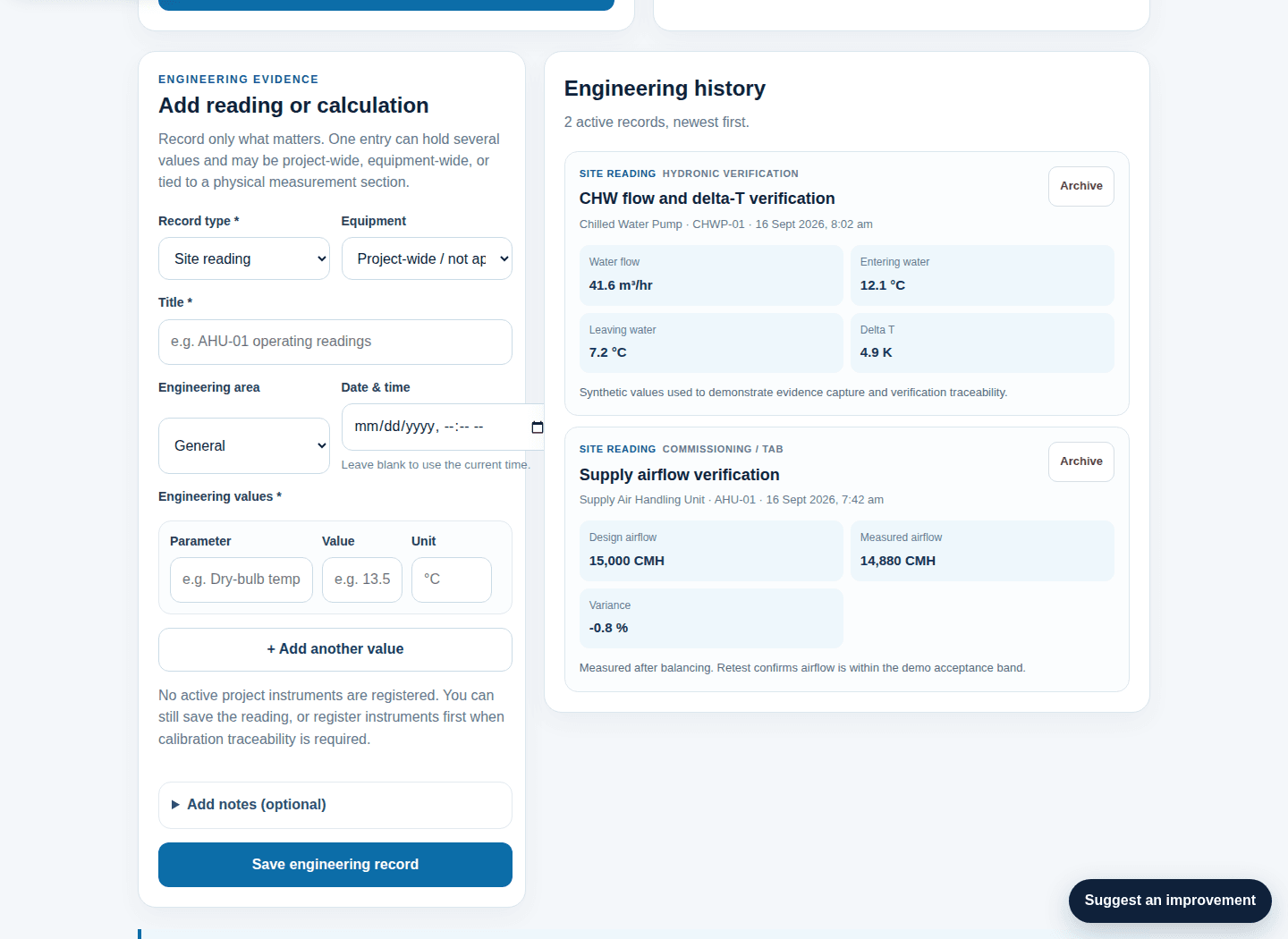
See how measured evidence remains visible after the field work.
This authentic release-candidate capture uses only sanitized synthetic readings and shows the real Engineering Evidence/history workspace.
Move from the walkthrough into real HVACR work.
Free Tools and the Basic Issue Finder remain available without creating a Project.