HVACR STUDIO · WORK MODES

Choose the work you are doing today.

A service technician should not have to navigate the same way as a consultant, commissioning engineer or facility team. Work Modes bring the most relevant HVACR tools and workflows forward for the job in front of you.

Work Modes are not subscription plans. They change the experience and starting point, not your commercial package.

HOW IT WORKS

Role-first navigation without locking you into one role.

Choose the mode that best matches the work you are doing now. You can still move to other tools and workflows whenever the job changes.

1

Choose the job

Start from the role or engineering task you are handling now.

2

See relevant work

HVACR Studio brings suitable tools, issue checks and workflows forward.

3

Go deeper when needed

Quick work stays simple; project persistence, evidence and reporting add depth when the job requires it.

REAL ROLE SELECTION

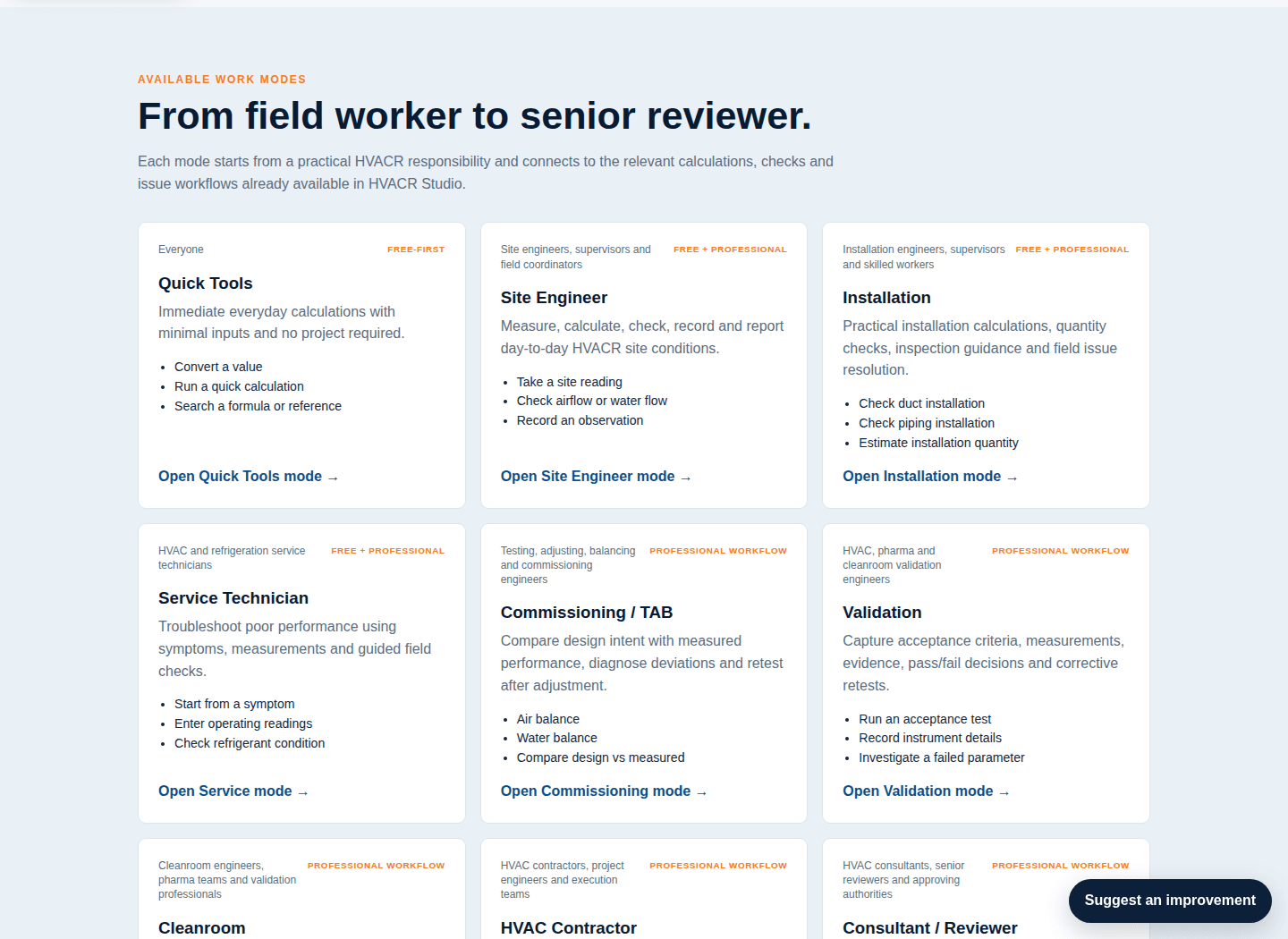
See the actual Work Modes a logged-out visitor can explore.

This approved release-candidate capture shows the real role cards and access intent. Work Modes remain task/role filters; they are not commercial packages.
AUTHENTIC PRODUCT CAPTURENO LOGIN · RELEASE-CANDIDATE UI
HVACR Studio Work Modes page showing role cards for Quick Tools, Site Engineer, Installation, Service Technician, Commissioning and Validation.
Role-first Work ModesReal logged-out Work Modes UI showing role and task filters rather than commercial subscription packages.
AVAILABLE WORK MODES

From field worker to senior reviewer.

Each mode starts from a practical HVACR responsibility and connects to the relevant calculations, checks and issue workflows already available in HVACR Studio.

EveryoneFREE-FIRST

Quick Tools

Immediate everyday calculations with minimal inputs and no project required.

  • Convert a value
  • Run a quick calculation
  • Search a formula or reference
Open Quick Tools mode →
Site engineers, supervisors and field coordinatorsFREE + PROFESSIONAL

Site Engineer

Measure, calculate, check, record and report day-to-day HVACR site conditions.

  • Take a site reading
  • Check airflow or water flow
  • Record an observation
Open Site Engineer mode →
Installation engineers, supervisors and skilled workersFREE + PROFESSIONAL

Installation

Practical installation calculations, quantity checks, inspection guidance and field issue resolution.

  • Check duct installation
  • Check piping installation
  • Estimate installation quantity
Open Installation mode →
HVAC and refrigeration service techniciansFREE + PROFESSIONAL

Service Technician

Troubleshoot poor performance using symptoms, measurements and guided field checks.

  • Start from a symptom
  • Enter operating readings
  • Check refrigerant condition
Open Service mode →
Testing, adjusting, balancing and commissioning engineersPROFESSIONAL WORKFLOW

Commissioning / TAB

Compare design intent with measured performance, diagnose deviations and retest after adjustment.

  • Air balance
  • Water balance
  • Compare design vs measured
Open Commissioning mode →
HVAC, pharma and cleanroom validation engineersPROFESSIONAL WORKFLOW

Validation

Capture acceptance criteria, measurements, evidence, pass/fail decisions and corrective retests.

  • Run an acceptance test
  • Record instrument details
  • Investigate a failed parameter
Open Validation mode →
Cleanroom engineers, pharma teams and validation professionalsPROFESSIONAL WORKFLOW

Cleanroom

Air-change, pressure, moisture and airflow checks tailored to controlled environments.

  • Check room air changes
  • Review pressure cascade
  • Check temperature and RH
Open Cleanroom mode →
HVAC contractors, project engineers and execution teamsPROFESSIONAL WORKFLOW

HVAC Contractor

Execution-focused calculations, checking, coordination, measurement and documentation around the approved design.

  • Run execution calculations
  • Check submitted or site values
  • Prepare a project record
Open Contractor mode →
HVAC consultants, senior reviewers and approving authoritiesPROFESSIONAL WORKFLOW

Consultant / Reviewer

Review submitted values, methods and performance without duplicating detailed building heat-load design.

  • Review a submitted value
  • Check an engineering range
  • Compare equipment data
Open Consultant mode →
Refrigeration engineers, technicians and application specialistsFREE + PROFESSIONAL

Refrigeration

Refrigerant reference, system checks and progressively deeper refrigeration-cycle analysis.

  • Look up refrigerant P-T
  • Check superheat/subcooling
  • Compare refrigerants
Open Refrigeration mode →
Cold-room contractors, service engineers and refrigeration teamsPROFESSIONAL WORKFLOW

Cold Room

Cold-room field performance, pull-down, refrigeration and moisture checks without replacing detailed load-design software.

  • Check room performance
  • Record temperature pull-down
  • Check refrigeration readings
Open Cold Room mode →
HVAC engineers working with chilled and hot water systemsFREE + PROFESSIONAL

Hydronics

Flow, pipe, pressure, pump and valve checks using known design or measured duty.

  • Calculate water flow
  • Check pipe velocity
  • Review system conditions
Open Hydronics mode →
AHU, ducting, ventilation and airside engineersFREE + PROFESSIONAL

Airside / AHU

Airflow, ventilation, duct, coil and AHU checks around the design and installed system.

  • Check airflow
  • Check duct conditions
  • Review AHU face velocity
Open Airside / AHU mode →
Energy auditors, facility engineers and performance consultantsPROFESSIONAL WORKFLOW

Energy & Performance

Compare design and actual HVACR performance and identify efficiency degradation.

  • Check COP/EER
  • Compare design vs actual
  • Review trend deviation
Open Energy mode →
HVACR equipment sales and application engineersFREE + PROFESSIONAL

Sales / Application Engineer

Fast customer-facing calculations, application checks and equipment data capture.

  • Convert customer data
  • Check application inputs
  • Compare options
Open Sales / Application mode →
Facility managers, operators and maintenance teamsPROFESSIONAL WORKFLOW

Facility / O&M

Plan preventive maintenance, keep equipment history, surface recurring issues and verify maintenance impact against the same project equipment register.

  • Plan preventive maintenance
  • Record maintenance activity
  • Review due and overdue work
Open Facility / O&M mode →
CONNECTED PROFESSIONAL WORK

Commissioning, validation and O&M do different jobs—but they should not lose the engineering trail between them.

The same project and equipment context can carry measurements, evidence, corrective actions, retests and verification forward instead of leaving each activity as an isolated form.

CONNECTED PROFESSIONAL WORKFLOWDifferent HVACR jobs. One traceable engineering trail.
SHARED CONTEXT
ProjectEquipmentDesign / OEM baseline
WORKFLOW

Commissioning / TAB

Open →

Compare design intent with measured air or water performance, adjust where required and preserve the retest trail.

  1. 1Design intent
  2. 2Measure
  3. 3Compare
  4. 4Adjust
  5. 5Retest
  6. 6Verify
WORKFLOW

Validation

Open →

Capture acceptance criteria, instrument context, measurements, deviations and the evidence used for pass/fail decisions.

  1. 1Acceptance criteria
  2. 2Instrument traceability
  3. 3Measure
  4. 4Decide
  5. 5Correct
  6. 6Retest
WORKFLOW

Facility / O&M

Open →

Connect preventive maintenance, equipment history, recurring issue signals and maintenance impact to the same asset record.

  1. 1Plan work
  2. 2Maintain
  3. 3Record reading
  4. 4Detect issue
  5. 5Act
  6. 6Verify impact
SHARED EVIDENCE & CLOSURE TRAILCompleted work is not the same as verified work.
  1. 1EvidenceKeep readings, files, photos and instrument context linked to the work.
  2. 2ActionRecord what was changed, assigned or completed and why.
  3. 3RetestMeasure again after the corrective or maintenance action.
  4. 4VerifyConfirm the outcome against the engineering or acceptance intent.
  5. 5Issued recordPreserve the verified history for reporting instead of silently rewriting it.

This map explains how HVACR Studio connects work records. It does not imply autonomous diagnosis, acceptance or engineering sign-off; judgement remains with the responsible professional.

DESIGNED FOR MIXED EXPERIENCE LEVELS

Simple starting points, engineering depth behind them.

HVACR Studio is intended for users ranging from installation teams and service technicians to commissioning engineers, consultants and validation professionals. The interface should reduce software terminology without hiding the engineering method.

Field friendlyStart from tasks, symptoms and readings rather than module names.
Engineering visibleMethods, applicability and verification remain explicit where they matter.
No forced registration for valueQuick tools remain useful before login; persistence and connected professional work can require an account.
START FROM YOUR WORK

Open the mode that fits today's HVACR job.

Open Work ModesExplore Issue Finder & Fixer →